Prerequisites
GearLoader is designed to load C/C++ DLLs. This tutorial will assume you can write your own DLL in either C or C++ and compile it targeting Windows x86_32.
Getting Started
First let's try compiling one of the examples mods. You can grab the latest devkit.zip from releases containing the example mods' source code and compiled dlls as well as some other resources. You can pick whichever one matches the language you want to use. The only files you'll need are the mod's single source file, its config.json file, and the appropriate header files from the include folder. You can just copy your chosen example's mod source folder and the include folder into your own project folder.
Now use your compiler of choice to create a shared library from the chosen source file and header files. The mod must be compiled for the same platform as GGXXACPR, that is Windows x86_32. It's highly recommend to statically link mod DLLs as well.
Once you have your DLL, couple it together with its config.json in its own mod folder as shown below:
Install GearLoader itself if you haven't already, and boot +R to confirm the mod successfully compiled. For the example mods, you can go to Survival mode to see if it's working.
config.json
Every mod requires a config.json in its mod folder in order to be loaded. There's a json schema file you can use to assist in writing your own config file (linked in example below).
Example config.json:
| Fields | Description | Required | Default |
|---|---|---|---|
| $schema | JSON schema support | Optional | N/A |
| name | The name of your mod. | Required | N/A |
| entryPoint | Path to your DLL. Can be omitted as long as your DLL is the only DLL in your mod's folder | Optional | First DLL found in mod folder |
| version | Your mod's version. Important if other mods require this as a dependency. | Optional | 0.0.0 |
| modLoaderVersion | The version of the mod loader you developed this mod for. | Optional | Currently installed version |
| ignore | GearLoader will not load this mod if true | Optional | false |
| dependencies | A list of other mods your mod needs. | Optional | None |
| dependencies.name | Name of the mod required. This will be the name given in the dependency's config.json | Required | N/A |
| dependencies.version | The version required | Optional | Latest available |
| dependencies.optional | This dependency will be prepared if available, but is not strictly required. | Optional | false |
GearLoader Header files
GearLoader provides several header files for mod developers, each having a C and C++ version. The gearLoader header files are required for implementing the Init function and interfacing with the GearLoader API. The baseMod header files are required for interfacing with the baseMod's modding API. The ggxxacpr header files are used in the baseMod header files and provide an ABI (binary interface) for known useful game data and code.
The C++ headers are wrappers of their base C counterparts. They primarily provide namespacing and additional type safety.
The Init function
Each mod may export an Init function. It is advised to use this function for any mod startup logic as opposed to DllMain. This function is required to interface with GearLoader's API, but it is not strictly required for the mod to be loaded by GearLoader. gearLoader_c.h is required when implementing an Init function. gearLoader.hpp is an optional C++ wrapper (see the C++ example mod).
Obtaining APIs of dependency mods
GearLoader uses a dependency and API registry system for inter-mod communication. Dependencies can be declared in the config.json file and their APIs can be retrieved with GearLoaderApi::RetrieveModApi. The mod loader includes the baseMod that exports a modding API. Mod APIs are stored and retrieved as unusable pointers of type const void* and should be cast before use.
Refer to the examples mods for a demonstration of retrieving the baseMod API.
BaseMod APIs
See BaseMod_Api for documentation.
There are 4 sub APIs. Most are self-explanatory except for the BaseMod_ModMenuApi.
Mod Menu API
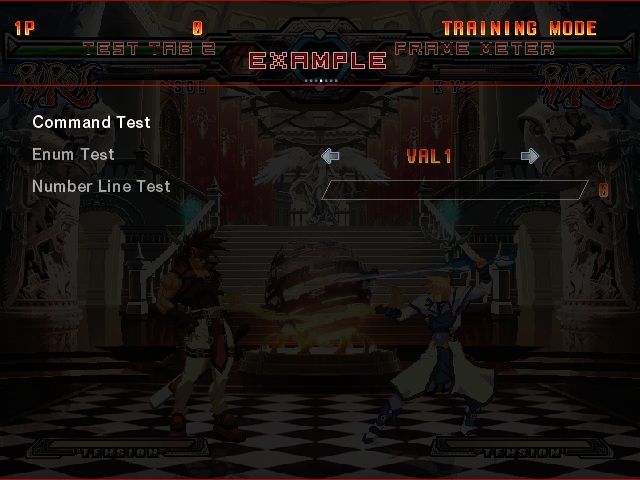
The BaseMod_ModMenuApi Allows mod developers to create a settings menu by passing an array of simple BaseMod_ModMenuEntry structs to BaseMod_ModMenuApi::RegisterMenuTab.Alternatively, More advanced settings menus can be registered with BaseMod_ModMenuApi::RegisterCustomMenuTab.
The mod settings menu can be located in "Any pause menu -> HELP & OPTIONS -> MOD SETTINGS". Tabs are switched with L1/R1.
Example:
Implementing a Custom Handler
Related API: BaseMod_ModMenuApi::RegisterCustomMenuTab.
Writing custom menu handlers is an advanced topic. I highly recommend reviewing the Base Mod's source code and a working example in the ACPR_Hitboxes source code to learn how to implement your own, but please note both are written in C++.
The BaseMod's ModMenu function is the top level mod settings menu handler. For basic menu tabs, it'll read menu definitions registered through BaseMod_ModMenuApi::RegisterMenuTab, draw them and handle their functionality. For custom handlers, it'll pass off some of this responsibility to the custom handler function. The BaseMod's ModMenu function will still handle drawing the menu headers, handling tab switching inputs, and handling the menu exit input. The custom handler will need to do its own rendering, handle its own state, and react to controller input. A set of helper functions for common custom handler problems are provided in the BaseMod_ModMenu_HelperFunctionsApi.
In some situations, you may want to implement a sub-menu or otherwise override some of the ModMenu function's higher level control responsibilities. You can accomplish this by handling fiber switching in your custom handler. See the Game Architecture Notes for more information on fibers and how they're managed in GGXXACPR. But all you need to know in this context is switching back to the main fiber is how we signal that we're done handling a frame but not closing the menu. You can handle this by simply calling BaseMod_ModMenu_HelperFunctionsApi::SwitchToMainFiber.