This tutorial will be for drawing custom sprites via the BaseMod_NativeFunctionsApi::RegisterSprites and BaseMod_NativeFunctionsApi::DrawSprite functions, NOT for replacing existing sprites.
We'll be using GearStudio to open and edit sprite files.
Creating Custom Resource Files
Refer to GearStudio documentation if available. At time of writing, functionality is mainly documented on its releases page.
But in a nutshell, this'll be the basic workflow:
- Copy an existing .bin file from +R's Resource folder into your workspace and open it via "File -> Open binary..."
- GearStudio can only open existing bin files at time of writing.
- Example file: "Guilty Gear XX Accent Core Plus R/Resource/demo/training.bin"
- Some resource files are in a format that GearStudio cannot open
- Remove / Replace existing sprites with the "Delete..." / "Import..." buttons respectively
- resource .bin files can have multiple images
- You can make any pallette adjustments with the "Open palette editor"
- Note that when using 4bpp sprites, they'll need to have an even numbered width in pixels (Weird +R limitation).
- "Save" when finished.
Registering Sprites
Now that we have a custom resource file, we need to pass it to +R's internal sprite registry via BaseMod_NativeFunctionsApi::RegisterSprites.
In your mod's code you'll need to open your resource file and load its data into memory. +R's internal sprite registry will reference this data via pointer, so you'll need to keep the data in memory and static for as long as it's registered.
The first few bytes of file data consists of an array of file address offsets pointing to each image's section in the resource file. This array terminates with the hex value 0xFFFFFFFF.
In the example binary below, the file address offsets are 0x20, 0x260, 0x4A0, and 0x6E0. Note the next 4 byte value at 0x10 in the file is the terminating value 0xFFFFFFFF.
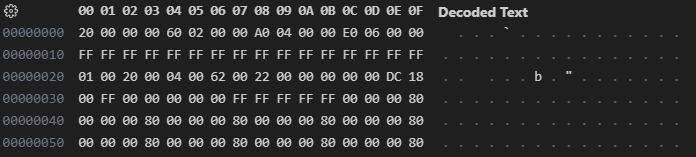
IMPORTANTLY, we must preprocess this data before passing it to +R's native function.
The BaseMod_NativeFunctionsApi::RegisterSprites function expects an array of data pointers, so the file address offsets need to be converted to data pointers. This can be accomplished by adding the address of the loaded file data to each file offset. For example, say you've stored the example binary above at address 0xABCD0000. Its offsets will need to be changed to 0xABCD0020, 0xABCD0260, 0xABCD04A0, and 0xABCD06E0 respectively.
I've implemented the task in C++ below for my FrameMeter mod:
Note that when the data variable reaches the terminating value 0xFFFFFFFF, it overwrites it to 0. The BaseMod_NativeFunctionsApi::RegisterSprites function will keep registering sprites until either the count parameter is reached or a zero (null pointer) is found in the textureDataArray parameter.
Drawing Sprites
After registering sprites at a spriteId, drawing them is as simple as calling the BaseMod_NativeFunctionsApi::DrawSprite function with that spriteId parameter. When registering multiple sprites, each sprite will be registered sequentially starting at the given spriteId parameter.